DailyWall
Choose Gift list, Wish list or Secret Santa above. For gifts, set a total budget, then add each person, the gift idea and what you plan to spend; tick it when it’s bought and the totals update. For Secret Santa, add everyone’s names and anyone who shouldn’t draw each other, tap Draw names, then pass the phone so each person reveals only their own match.
How to make a Christmas gift list that stays on budget
Most overspending at Christmas comes from buying one present at a time without a total in mind. Start the other way round: decide what you can spend on gifts this year, write it in Total budget, then share it out between the people on your list before you start shopping.
A simple way to share it out is in three tiers: the closest people (partner, children, parents) get the largest amounts, the wider family and close friends a middle amount, and colleagues, neighbors and teachers a small fixed amount or a group gift. The tool adds up your plans as you go and shows what’s left, so you can see straight away if one idea pushes you over.
Tick the steps as you go
Christmas wish list: how to write one people can actually use
A good wish list saves the people who love you a lot of guessing. Be specific enough that someone could buy the thing without asking you: the size, the color, the model, or the shop where you saw it. Add a rough price so people can pick something that fits their own budget, and mark two or three favorites so they know what matters most to you.
Mix price points: a couple of small things anyone could get, a few mid-range ones and one bigger wish that family could club together for. Experiences count too: tickets, a class, a day out together. When you’re done, print the list or save it as a PDF and send it to whoever asked.
How the Secret Santa draw works
Secret Santa (also called Kris Kringle, or a gift exchange) means everyone in the group buys one present for one other person, chosen at random, usually with a spending limit. The draw here makes sure nobody gets themselves, and it respects any rules you add: a couple who live together, say, or two people who drew each other last year can be kept apart in one direction or both.
Nothing is sent anywhere. The draw happens on this device and the results stay in this browser. The easiest way to run it is to pass the phone around: each person taps their own name, sees their match, then taps Hide and pass on. If you’re organizing for a group that won’t be in one place, print the slips instead: each slip has the giver’s name on the outside and their match on the inside, fold it and hand it out.
Tick the steps as you go
Print it, save it as a PDF, or put it on your Lock Screen
Print or save as PDF prints only the list you’re looking at, laid out for paper: the gift list as a table with totals, the wish list as a tidy page, Secret Santa as cut-out slips. In the print window, choose Save as PDF to keep a copy or send it by message.
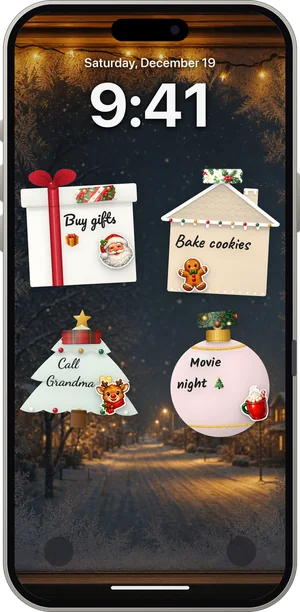
The Lock Screen option turns your list into an iPhone wallpaper on a Christmas background. It’s a snapshot: it shows the list as it is now. If you want a list that updates itself when you tick things off, and that the rest of the family can see on their own phones, that’s what DailyWall does.
Keep your Christmas list on your Lock Screen with DailyWall
DailyWall puts your notes and lists on the iPhone Lock Screen as paper sticky notes. Write the gift list as a checklist note, tick presents off as you buy them, and a one-time Shortcuts automation sets the updated wall as your wallpaper each time you close the app.
For the family, make a shared wall and invite them: everyone sees the same notes on their own phone (and on their Lock Screen once they’ve set it up), so the shopping list for Christmas dinner or the plan for who’s driving whom is in one place. Keep surprise presents on your personal wall, since everyone on a shared wall sees every note. You can also use one of our free Christmas wallpapers as the background behind your notes.
Questions people ask
Is this Christmas list maker free?
Yes. It’s free, there’s no account or email, and it works on phones and computers.
Is my list saved? Can anyone else see it?
Your lists are saved only in this browser on this device, so they’re there when you come back. Nothing is uploaded and nobody else can see them. Clearing your browser data removes them.
How do I do a Secret Santa draw without anyone knowing the results?
Draw the names, then pass the phone around: each person taps only their own name, sees their match and taps Hide and pass on. The organizer can see all matches if they look, so if you’re taking part too, let someone else run it.
Can I stop couples from drawing each other in Secret Santa?
Yes. Under “Who shouldn’t draw whom?”, pick the two names and add the rule. Leave Both ways ticked so neither draws the other.
How much should I spend on Christmas gifts?
There’s no right number. Start from what you can afford after December’s other costs, write that as your total budget, then divide it between people. The totals in the tool show what’s planned, what’s bought and what’s left.
Can I print my Christmas list or save it as a PDF?
Yes. Tap Print or save as PDF. In the print window, choose a printer or Save as PDF. Secret Santa prints as cut-out slips.
How do I put my Christmas list on my iPhone Lock Screen?
Scroll to “Put your list on your Lock Screen”, pick a background and tap Download wallpaper. Save the image to Photos, then touch and hold your Lock Screen, tap + and choose Photos. For a list that updates itself, use DailyWall.